
Remote work has become a long-term reality for many professionals. While working from home offers flexibility and comfort, productivity often depends on how well your workspace is designed. A thoughtfully organized environment reduces distractions, improves focus, and supports both physical and mental well-being.
Creating a productive work-from-home space does not require a large office or expensive furniture. With smart planning, the right tools, and intentional habits, you can build a workspace that keeps you motivated and efficient throughout the day.
Why Your Home Workspace Matters
Your environment directly affects how you work. A cluttered or uncomfortable workspace can reduce concentration and increase fatigue.
A dedicated home office helps you:
- Improve focus by separating work from personal life
- Increase productivity with organized tools and equipment
- Maintain better posture and health with ergonomic furniture
- Reduce stress by creating a calm and structured environment
Even a small corner can become a powerful productivity hub when designed intentionally.
Choose the Right Location
The first step in building a productive workspace is selecting the right spot in your home.
Prioritize Quiet and Focus
Pick a location with minimal interruptions. If possible, avoid high-traffic areas like the living room or kitchen.
Take Advantage of Natural Light
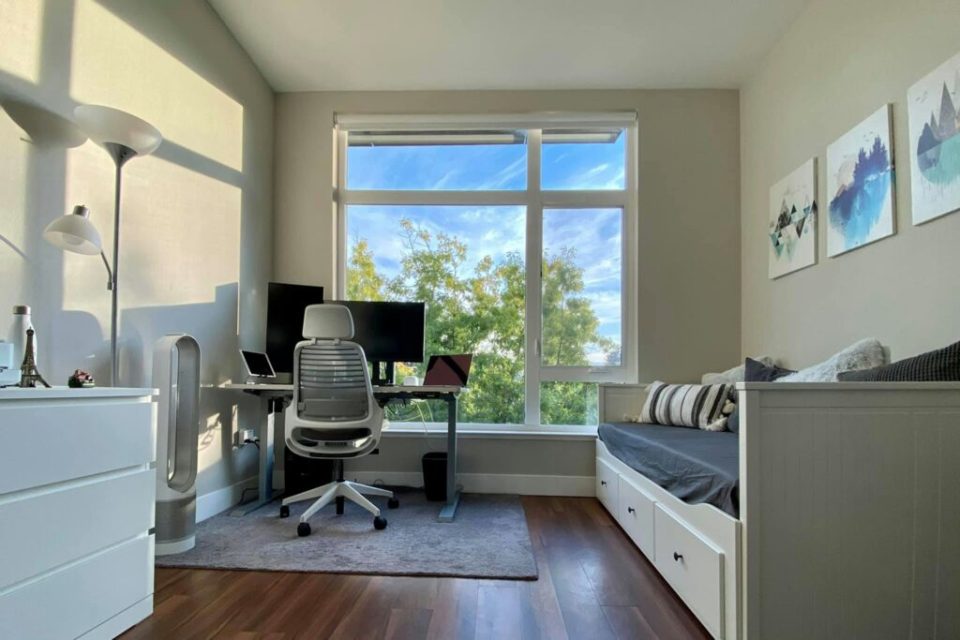
Natural light can boost mood and reduce eye strain. Position your desk near a window when possible.
Separate Work From Relaxation
Working in the same place where you relax or sleep can blur boundaries. If you must work in a bedroom, create a clear visual separation between your work desk and personal space.
Invest in Ergonomic Furniture
Comfort plays a major role in maintaining productivity during long work sessions.
Essential Ergonomic Elements
- Supportive chair: Choose a chair with lumbar support and adjustable height.
- Desk height: Your elbows should form a 90-degree angle when typing.
- Monitor placement: The top of the screen should be at or slightly below eye level.
- Keyboard and mouse: Keep them at a comfortable distance to avoid wrist strain.
Good ergonomics help prevent fatigue, neck pain, and repetitive strain injuries.
Keep Your Workspace Organized
An organized workspace allows you to focus on tasks instead of searching for tools or documents.
Practical Organization Tips
- Use desk trays or organizers for paperwork
- Keep only essential items on the desk
- Store cables neatly with clips or cable sleeves
- Maintain a simple filing system for documents
A clutter-free desk promotes clear thinking and better productivity.
Add Productivity-Boosting Elements
Small design choices can make your workspace more inspiring and motivating.
Helpful Additions
- Plants: Improve air quality and add a calming visual element
- Good lighting: Use a desk lamp for evening work
- Noise control: Noise-canceling headphones or soft background music
- Whiteboards or planners: Useful for task tracking and brainstorming
Personal touches such as photos or artwork can also make the workspace feel more welcoming.
Minimize Digital Distractions
Working from home often means easy access to social media, television, or household distractions.
Strategies to Stay Focused
- Turn off unnecessary notifications
- Use website blockers during deep work sessions
- Schedule specific times for email and messaging
- Keep your phone out of reach while working
These small adjustments help maintain consistent concentration throughout the day.
Establish a Daily Work Routine
A productive workspace works best when combined with structured habits.
Effective Work-From-Home Habits
- Start and end work at the same time each day
- Take short breaks every 60–90 minutes
- Plan tasks using a daily priority list
- Leave your workspace at the end of the day to mentally disconnect
Consistent routines help create a clear boundary between professional and personal life.
Optimize Your Technology Setup
Reliable technology prevents interruptions and improves workflow efficiency.
Essential Tools for Remote Work
- Fast and stable internet connection
- External monitor for multitasking
- Quality webcam and microphone for meetings
- Cloud storage for easy file access
Investing in the right technology saves time and reduces frustration during remote work.
Maintain Work-Life Balance
A well-designed workspace should support both productivity and personal well-being.
Avoid working from the couch or bed whenever possible. When the workday ends, step away from your desk and focus on personal activities.
Creating this boundary helps prevent burnout and maintain long-term motivation.
Conclusion
A productive work-from-home space is more than just a desk and a laptop. It is an environment intentionally designed to support focus, comfort, and efficiency.
By choosing the right location, investing in ergonomic furniture, organizing your desk, and maintaining healthy work routines, you can transform any small area into a powerful productivity center.
With the right setup, working from home can become not only convenient but also highly effective.
Frequently Asked Questions (FAQs)
1. What is the ideal size for a home office workspace?
A productive workspace does not require a large room. Even a small desk area of 3–4 feet can be sufficient if it is well organized and comfortable.
2. How can I stay productive when working from home?
Establish a daily routine, reduce distractions, keep your workspace organized, and schedule regular breaks to maintain focus.
3. Is natural light important for a home office?
Yes. Natural light improves mood, reduces eye strain, and can increase energy levels during the workday.
4. What are the most important items in a work-from-home setup?
The essentials include a comfortable chair, functional desk, reliable internet connection, good lighting, and a computer setup suitable for your work.
5. How do I avoid distractions while working at home?
Use productivity tools, turn off non-essential notifications, create a quiet workspace, and communicate clear boundaries with family members.
6. Should I personalize my workspace?
Yes. Adding plants, artwork, or personal items can make your workspace more inspiring and enjoyable.
7. How often should I take breaks while working from home?
Experts recommend taking short breaks every 60–90 minutes to rest your eyes, stretch your body, and maintain productivity throughout the day.
